What Is a Verified Facebook Business Manager? (A Complete Guide)
If you work with Facebook ads, run an advertising agency, or purchase media as part of your job, you may have come across the term "verified business manager" or "verified BM." This term is especially important when you're facing issues like ad account restrictions or daily spending limits. Many advertisers seek out a verified setup because it can make a significant difference in how their campaigns perform.
So, what is a verified business manager, and why is it so important in the advertising world? A verified business manager is essentially a Meta Business Manager account that has gone through a specific verification process set by Meta. This process ensures that the account is linked to a legitimate, legally registered business. When Meta checks and confirms the business name, address, phone number, and website against official documents, the account receives a "Verified" status.
Having this verification is crucial because it boosts the trustworthiness of your account within Meta's system. This means that your account is less likely to face sudden restrictions, which can be a real headache for advertisers. Additionally, verified accounts can access features that are not available to those without verification, making it a valuable asset for anyone serious about running effective ad campaigns.
In this guide, we will break down what a verified business manager is, the advantages it offers, and some limitations you should be aware of. Understanding these aspects can help you make informed decisions about your advertising strategies and ensure that your campaigns run smoothly.
What Does "Verified Business Manager" Actually Mean?
A verified business manager is a Meta Business Manager account that has successfully completed Meta's official business verification process. This means Meta has manually or automatically reviewed and confirmed that the account belongs to a real, legally registered business entity.
When Meta matches the legal business name, physical address, phone number, and website domain with official government-issued documents provided by the user, the business manager is granted a "Verified" status. This verification significantly increases the internal trust score of the account within Meta's ecosystem, reducing the likelihood of sudden restrictions and unlocking features unavailable to unverified accounts.
Key Differences between Standard BM and Verified BM
Many advertisers wonder if the effort to verify an account is actually worth it. Understanding the difference between a standard setup and a verified Facebook BM clarifies why the latter is heavily preferred for serious ad campaigns.
- Improved Trust Score and Account Stability: Meta naturally places higher trust in accounts associated with a verified identity. Small mistakes, algorithm glitches, or slightly unusual activities (like logging in from a new IP address or adding a new payment card) are less likely to trigger immediate account restrictions. Unverified accounts often face instant security locks for the exact same actions.
- Higher Daily Ad Spend Limits: Brand new or unverified ad accounts typically face a strict daily ad spend limit, often capped at $50. This means you cannot spend more than $50 a day, regardless of your budget. Completing the Facebook Business Manager verification process allows you to request limit increases much faster, and verified accounts often start with significantly higher baseline limits.
- Business Asset Security: A verified BM acts as a safer central hub for managing your ad accounts, Facebook Pages, Instagram profiles, WhatsApp Business API, and tracking pixels. If an individual ad account gets disabled, having a verified BM makes it much easier to create a new ad account and continue operating without losing all your data.
- Advanced Feature Access: Certain professional features require a verified business status by default. This includes gaining access to the WhatsApp Business API, getting specific developer apps approved, or registering a Facebook Page as a recognized news entity.
How Does the Meta Business Verification Process Work?
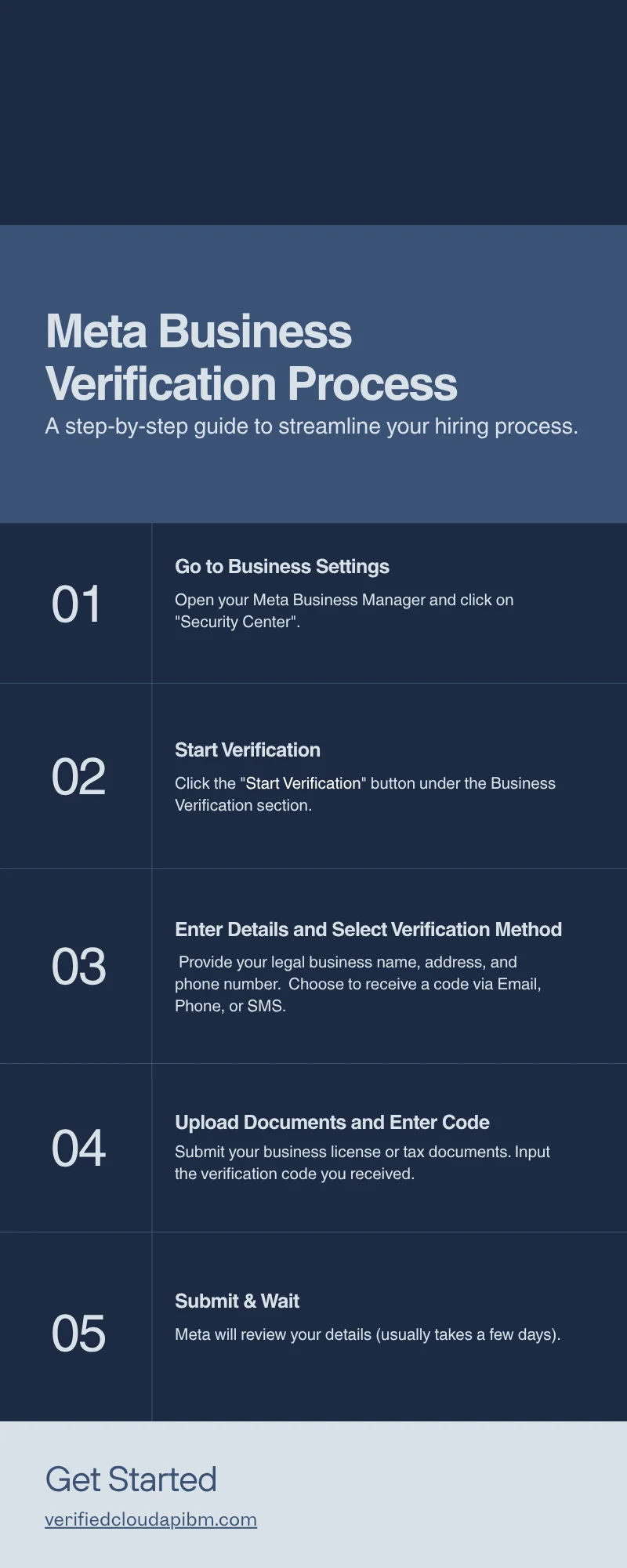
To verify a business manager, Meta requires specific proof of your business's existence. The general looks like ,
- Preparation: You must ensure you have a functional, secure website (preferably with an email address matching the domain) and official business registration documents.
- Accessing the Security Center: Navigate to your Meta Business Settings and locate the 'Security Center' tab. (If the verification button is grayed out, developers sometimes need to create a dummy app in the Meta for Developers portal to trigger the option).
- Submitting Business Details: You must input your exact legal business name, address, business phone number, and website. These details must perfectly match the documents you intend to upload.
- Document Upload: Meta requires valid, accepted documents such as a business license, certificate of incorporation, VAT/Tax certificate, or a recent utility bill in the business's name.
- Contact Verification: Finally, you must verify your contact method via a phone call, text, or an email domain verification (e.g., receiving a code at admin@yourdomain.com).
The reality is that this process is not always smooth. Even with completely legitimate documents, Meta's automated systems frequently reject verification attempts due to minor discrepancies, such as a slight spelling difference between the tax document and the website's footer.
What to Check Before Using a Third-Party Solution
Because the official verification process can be time-consuming or difficult for businesses lacking specific documents, many advertisers look for ready-made solutions to launch their campaigns without delay. If you need a stable setup quickly, you might explore a verified Facebook Business Manager to streamline your ad operations.
However, if you choose to acquire or rent an account from a third party, you must check several critical factors before proceeding, like
- Full Admin Access: Ensure you receive full administrative control over the Business Manager. Without admin access, you cannot safely assign people, add pages, or manage payment methods independently.
- Account Security History: Check the "People" and "Partners" tabs in the Business Settings immediately to ensure there are no hidden or unauthorized users tied to the account.
- Understanding Seller Terminology: The marketplace is full of terms like "BM1," "BM5," "BM2500," or "Unlimited BM." It is crucial to understand that these are NOT official Meta categories. These are labels created by sellers to describe the account's current capabilities. For example, "BM5" simply means the Business Manager currently has the capacity to create up to 5 ad accounts. "BM2500" indicates the daily ad spend limit is currently capped at $2500. Always clarify what these terms mean with your provider, as availability and limits can vary based on Meta's current policies.
- Support and Replacement Policies: Even the best accounts can face issues. Verify whether the provider offers replacement guarantees or technical support if the account gets restricted due to a Meta algorithm error rather than a policy violation on your end.
Can a Verified Facebook BM Still Get Restricted?
A very common myth in the media buying community is that a verified BM is completely immune to bans. This is completely false. A verified BM can and will be restricted if you violate Meta's advertising policies.
Verification provides a higher trust score, not a free pass to break the rules. Your account will still be disabled for:
- Circumventing Systems: Attempting to hide landing pages, using cloaking software, or repeatedly trying to push rejected ads.
- Prohibited Content: Running ads for restricted products, adult content, misleading claims, or fake goods.
- High Rejection Rates: If a high percentage of your ads are consistently rejected, Meta will flag the entire Business Manager as a risk.
- Payment Failures: Suspicious payment activity, such as using virtual cards from different countries, frequent chargebacks, or failing to pay outstanding balances.
You must still adhere strictly to Meta's Community Standards and Advertising Policies to keep a verified account healthy.
Making the Right Choice for Your Ad Campaigns
Running Facebook ads successfully at scale requires a stable infrastructure, and a verified business manager is the foundation of that stability. It protects your data, allows you to spend your budget efficiently, and protects your assets from sudden algorithm triggers. However, it is not a permanent guarantee against restrictions. Staying compliant with Meta's policies remains your most important responsibility. Whether you go through the manual verification process with your own corporate documents or utilize a ready-made verified solution to save time, securing your advertising assets should be your top priority before launching large-scale campaigns.
FAQ Section
Q: Can a verified Business Manager still get restricted? A: Yes. A verified BM can be restricted if you violate Meta's advertising policies, experience repeated ad rejections, or have suspicious payment activity. Verification increases trust but does not grant immunity from the rules.
Q: How long does Facebook Business Manager verification take? A: Once you submit your documents, the review process typically takes anywhere from 24 hours to a week. The exact timeframe depends entirely on Meta's internal manual and automated review queues.
Q: Do advertising agencies really need a verified BM? A: Yes. Because agencies manage multiple client accounts, pages, and pixels simultaneously, maintaining a verified BM is essential to centralize operations, keep trust scores high, and prevent the loss of access to client assets.
Q: What documents are required for business verification? A: Meta generally accepts government-issued business licenses, articles of incorporation, tax/VAT certificates, and recent business utility bills. The documents must clearly show the legal business name and address exactly as entered in the Business Settings.
Q: What do terms like BM2500 or Unlimited BM mean? A: These are not official Meta terms. Sellers use them to describe an account's limits. "BM2500" means the ad accounts within that BM have a $2500 daily spend limit. "Unlimited BM" means the account has no daily spend cap, and "BM5" means the account can host up to 5 ad accounts.